
Tails issues and code are managed in GitLab.
This page focuses on aspects of GitLab usage that are specific to Tails.
This workflow is not set in stone: it will evolve based on what we learn while using GitLab.
For general GitLab usage information, see the GitLab user documentation.
- GitLab source code and bug tracker
- Getting started
- Two-factor authentication
- Group and projects
- How we use GitLab metadata
- How to document progress
- How to propose, review, and merge changes
- How to request and provide input
- Email interface
- Scripts that use the GitLab API
- Core teams' work
- GitLab CI
- Access control
- Operations
Getting started
If you were using Redmine previously, read how to transition to GitLab. If you have an account at 0xacab, you can go to the Tails Gitlab login page and use your 0xacab account to sign in. Else, to request a GitLab account, please e-mail foundations@tails.net. If you want, you can add your pronouns to your GitLab account so that your pronouns appear next to your name in your profile. Also, your pronouns will appear when someone hovers over your GitLab username.
Once you have created your GitLab account, you will be allowed to open new issues, create merge requests, and fork your own copy of our repositories.
Later on, you will probably need to:
- Add your SSH key to your GitLab account
- Request more credentials
The first time you connect over SSH to a Git repository hosted on our GitLab, you will be prompted to verify the server's SSH host key. Here are the corresponding fingerprints:
- ECDSA:
SHA256:AOj9ec6hRjN7fNnjXMlmPum7dZWRd5oJKAuo4UGAxxs - Ed25519:
SHA256:mtZeDs2+KKLZ8kJOvmrGoTCuszqc29DOyH6MZaqtlss - RSA:
SHA256:JuwD+e+wOas+2JtDdF0BHu+9RAIJOhWI+2VkjuZ6Znk
Two-factor authentication
Access to some of our repositories requires you to enable two-factor authentication (2FA) for your GitLab account.
To learn how to enable 2FA for your GitLab account, read the GitLab documentation on two-factor authentication.
GitLab supports time-based one-time passwords (TOTPs) for two-factor authentication. You can use Secrets in Tails to generate TOTPs.
To use Secrets in Tails to generate TOTPs:
- Create a password database to store the secrets needed to generate TOTPs. To maximize security, this database should be separate from the database that you use to store your passwords. Learn more.
- Add a new password entry for the account that you want to generate TOTPs for.
- Choose Show more.
- Enter your secret key for generating TOTPs. Do not include any spaces.
Group and projects
All our work is tracked in projects under the tails group.
The main Git repository and most issues live in the tails/tails project.
How we use GitLab metadata
On GitLab, issues and merge requests have metadata.
Being consistent in the use of GitLab metadata makes collective work smoother.
Title and description
The title should be a short but clear description of what this is about. Some people are case sensitive, please try to consider that.
Status
Open issues
Each open issue can have up to 1 status label:
To Do: this issue is actionable and it would be good if someone worked on it
Doing: someone is actively working on this issue
Needs Validation: a resolution has been proposed and needs to be reviewed. For details, see our merge policy.
The main advantage of using these labels is to organize and visualize issues on Issue Boards.
The UX and Tails teams triage issues that have no status label.
Closed issues
Closing an issue means one of:
The bugfix or feature the issue is about:
- was merged and will be in a future release
- or is already available to our users
The Milestone value tells in which case we are.
We've rejected it.
For example: it does not fit into Tails' mission, or the problem shall be resolved elsewhere than in Tails.
To reject an issue, create a comment that:
- explains why you're rejecting it
- adds the Rejected label (
/label ~Rejected)
It duplicates another issue.
To mark an issue as a duplicate, create a comment that:
- mentions the other, duplicated issue
- adds the Duplicate label (
/label ~Duplicate)
Assignee
We use the Assignee field in a way that helps us organize our work as a team, focus on what matters most currently, and avoid individual over-commitment & feelings of failure.
To this aim, most tasks should be up for grabs for anyone who has spare capacity and the required skills: Don't Lick the Cookie.
So in general, issues and merge requests should not be assigned to anyone.
This being said, we do assign them if at least one of these conditions is met:
Someone is actively working on it.
The task is both important and urgent.
The milestone is set to the next Tails release. See the milestone section for details.
We did all the work we could on this task already and now have to track progress on a blocker that we cannot address ourselves. For example, regularly tracking progress and pinging on patches we've submitted upstream.
Only one of us can complete the task. This helps identify bottlenecks, high bus factor, and over-commitment.
Sponsor deliverables that are managed under the "let's decide a long time in advance who exactly will do each task" paradigm.
It is about the parent tracking issue for a large project with several subtasks that will be tackled by different people, and we need someone to coordinate the project.
Milestone
Different teams and contributors use the Milestone value differently:
- Some teams try their best to treat it as a commitment, that other Tails contributors should be able to rely on.
- Others use it as a pool of tasks they want to have on their short-term radar.
For issues that are on our roadmap, no milestone is set,
until it makes sense to target a specific release. However, such issues
have a $YEAR label.
Postponing to the next milestone more than once is not business as usual — it's a red flag. Ideally, the underlying problem should be identified and addressed: for example, the assignee might need help or be over-committed; the team could be under-staffed; or perhaps the task should simply not have any milestone in the first place.
Priority
Every open issue must have exactly 0 or 1 of these labels:
- P:Low: it would be good to do this, but the Tails Team does not think it's important enough for team members to spend time on it — contributions are welcome though!
- P:Normal, or no such label: this is the general case
- P:Elevated
- P:High
- P:Urgent
See the list of priority labels.
Category
We classify issues with labels whose name starts with C:.
For example, C:Email Client or C:Installation.
See the list of category labels.
Type of work
To indicate the type of work that's needed to complete the next step on an issue, we use labels whose name starts with T:.
For example:
T:Debian: the work shall be done in Debian
T:End-user documentation: everything below doc and support on our website
T:Contributors documentation: everything below contribute on our website
T:Wait: we are waiting/tracking actions we need non-Tails people to do, outside of Tails
T:Website: website work not covered by other options
See the list of type of work labels.
Other labels
- Starter: issues flagged as Starter can be a good pick for new contributors. Learn more.
Relationships between issues
Arguably, GitLab CE is a bit limited when it comes to expressing semantic relationships between issues. Here is how we can overcome these limitations.
Parent/subtask and Blocks relationship
A GitLab issue can have a task list.
Every task is a task list can be:
free-form text
a
#NNNNlink to another issue, that needs to be closed before the issue with the task list can itself be closed.
Related issues
You can list related issues either in the description or in a comment.
Either way, this adds a message in the Activity stream of the referenced issue, with a link to the referencing issue.
Confidential issues
You can make an issue confidential when creating it or at any later time.
A confidential issue is visible only by:
whoever created it
project members with at least Reporter access; that is, for our main GitLab project: most past and present Tails contributors
Only share the URL of an attachment with people you want to allow downloading that file.
In contrast with Redmine, that enforced access control on attachments, with
GitLab, anyone can download
If your team regularly manipulates confidential data, then its issues live under a dedicated GitLab project, with a different set of members, and possibly only visible to project members.
How to document progress
Create and update issues
When you start working on a task, update the corresponding GitLab issue, after creating one if needed: replace any status label with the Doing label. For details about labels, see metadata.
All the knowledge useful to the others should be kept on that issue, or at least linked from there.
Please keep the issues you are working on updated, so that they reflect the actual status of the task, and especially the next thing to do for it to be completed.
When committing changes that will resolve an issue once merged, please
include #NNNN in the commit message, NNNN
being the issue number. Then, GitLab will automatically reference this
commit on the corresponding issue, once the branch is pushed to our
Git repository. For example:
Write release notes for 4.27 (#18214)
Report progress or failure
It is important to:
Keep the team informed of how you feel committed to issues assigned to you, and about the timeline you're envisioning.
Avoid individual over-commitment & feelings of failure.
If you don't think you will manage to work on an issue any time soon, it's often best to make this clear on the issue, or to de-assign yourself.
For details, see how we use the assignee and milestone information.
How to propose, review, and merge changes
We use Merge Requests (aka. MRs) to propose, review, and merge changes.
See:
Confidential merge requests
When an issue is confidential, we make the Merge Request confidential, too. Confidential Merge Requests in Gitlab follow a very different path:
- They don't happen in tails/tails, but in tails/tails-private. Both the source branch and the target branch must be in tails-private! Beware, if you target a branch on tails/tails then your code will become public.
- When they get merged, they are only merged to tails-private. It's then up to the release manager to merge from tails-private during the release process.
How to request and provide input
How to participate in discussions
You can comment on issues and merge requests. The Tor Project Code of Conduct applies.
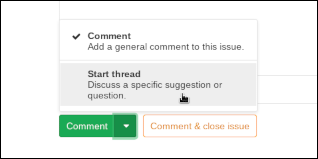
If you want to start a new discussion, please use Start thread instead of Comment: a thread can be marked as resolved, while a comment cannot. This helps keeping track of which discussions have reached a conclusion, and which ones are still pending.
To start a thread, type your message and choose Start thread in the Comment split button.
For more information, see the GitLab documentation about Discussions.
Requesting input from someone else
If you need input from someone else on an issue or merge request,
ask your question in a comment there, mentioning them
with their GitLab login name: @nick. GitLab will send them
an email notification about it and add it to their To-Do list.
If you want to raise attention of every single member of a team, mention it with
the name of the corresponding group:
@xyz-team. GitLab will send an email notification about it to every member
of this group, and add it to their To-Do list.
Please note that the root user is part of all groups only because it is used
for the administration of our GitLab instance. There's no human being behind
that account and its notifications are turned off. Do not expect to receive
answers from that user, make sure to mention other appropriate users and groups
instead.
Acting upon input requests
It's important to provide requested information as quickly as you can, to make the Tails contribution process more efficient and enjoyable.
When input is requested from you on an issue or merge request with @nick:
GitLab adds an item in your To-Do list.
GitLab may send you an email notification
Please ensure your GitLab email notification settings and your email setup allow you to receive and notice these messages.
When you receive such a request, if you cannot provide the requested input immediately, you're responsible for keeping track of this task, for example via the To-Do list, or by creating a new issue assigned to yourself, or using whatever personal organization tools work for you.
Email interface
Using the email address registered with your GitLab account, you can:
Stay informed of what's happening in GitLab
To do so, enable email notifications.
Participate in discussions on issues and merge requests, modify issues metadata
To do so, reply to an email notification you've received from GitLab.
Write your email just as if you [replied from the web]. In particular:
- Write your email in Markdown.
- You can use Quick actions.
Create new issues
See New issue via email in the GitLab documentation.
Scripts that use the GitLab API
We have several scripts that query or manipulate data using the GitLab API: for example, bin/generate-changelog and bin/generate-report.
To use them:
Install the
python3-gitlabDebian package:sudo apt install python3-gitlabConfigure your
~/.python-gitlab.cfg.You need at least this content:
  [global]
  ssl_verify = true

  [Tails]
  url = https://gitlab.tails.boum.org
  per_page = 100
  private_token = XXX
In the
Tailssection, set the value of theprivate_tokenoption to a GitLab API token for your own user. To generate such a token, visit -/user settings/personal access tokens.If you are working from Tails, run the scripts using
torsocks.
Core teams' work
Some of the teams who do Core work (be it paid or done on a volunteer basis) maintain GitLab metadata in order to:
provide visibility on what they doing & their priorities;
give the Tails community some power over setting these priorities;
get notifications about issues newly added to their plate;
encourage the Tails community to help core workers define their priorities: they sometimes have a hard time deciding by themselves how they should spend their time on what matters the most to the project.
To track this, these teams use labels whose name starts with Core work.
Such a label on an issue means that the corresponding team thinks it's worth investing Tails resources, and considers it's their responsibility to fix the issue. This does not imply they will have the capacity to do so quickly.
The teams who use this mechanism are more than happy to get feedback about these priorities: both addition and removal suggestions are welcome. Please check the mission statement for the corresponding team first, to ensure you're not asking them to do something that's outside of the scope of their job. And please justify your suggestions. Please check these views once in a while and talk to us! :)
GitLab CI
We use GitLab CI for some quality assurance checks that don't require building or booting Tails images.
Container images policy
Because we use give a lot of power to some jobs in the CI, we have a Container image policy that should be followed when building, pushing and using container images in our GitLab.
Access control
Requesting access
If you need to do something in GitLab and you appear to lack the needed credentials, please ask the Tails Team.
They will triage your request and potentially grant you more power.
For example, you will need "Reporter" access on the tails/tails project in order to add labels or assign issues.
If your collaboration with a new contributor would benefit from them having such credentials, please help them request access.
Adding/removing access
Do not grant access via the web interface:
Such manual changes would be later overwritten by automated processes.
Manual changes can easily have side effects that violate our access control requirements.
Instead, after following the relevant process (if any), request the access modification from the Tails Team.
Relevant GitLab doc
Access levels
We use the Protected branch flow:
Our major branches and release tags are marked as "Protected".
Committers get "Maintainer" access.
This is done via the
.committersvariable in our gitlabracadabra configuration. This is subject to approval by the Board.Regular, particularly trusted contributors, who are not granted full commit access but have access to our CI, get "Developer" access. They can push a topic branch to the canonical Git repository and our CI will pick it up. They can also modify any non-protected topic branch.
This is done via the
.developersvariable in our gitlabracadabra configuration. This is subject to approval by the Board.Other contributors get access strictly lower than "Developer". They push topic branches to their own fork of the repository and create merge requests.
Our Jenkins CI jobs generation process is the same as in pre-GitLab days.
Operations
Administrator accounts
To protect ourselves against human error and to decrease our attack surface, individual GitLab accounts with administrator privileges MUST be used according to these requirements:
2FA is enabled, ideally using a separate device.
You use your administrator account in a web browser environment that is separate from, and cannot be easily confused with, the one where use you your regular GitLab account: for example, in a dedicated web browser profile, or in a short-lived "incognito" window.
If you use your administrator account via the API, use a setup separate from the one you use for operations that don't need administrator privileges.
More specifically, in your
~/.python-gitlab.cfg, create a new dedicatedTailsRootsection for your administrator account, separate from your other existing sections (Tails,TailsRM, etc.). Other documentation relies on this configuration existing and being called like that.You manually log out from the administrator account as soon as you don't need the corresponding elevated privileges anymore. Closing the window is not sufficient to achieve this in the general case.
Administration of GitLab
Our friends at https://www.immerda.ch/ host the Tails' GitLab instance. We usually contact them through e-mail (see their contact info).
The Tails Team administrates this GitLab instance:
See responsibilities on https://gitlab.tails.boum.org/tails/team/-/wikis/roles/frontdesk
They don't have shell access to the VM hosting the service so, among many other things, using Server Hooks is not easy and would depend on coordination with the service provider.
Configuration of GitLab
The configuration of our GitLab instance lives in the private tails/gitlab-config GitLab project.
If you have access to that project, you can propose configuration changes: push a topic branch and submit a merge request.
This can be useful, for example:
to modify group membership when someone joins or leaves a team
to propose new labels shared by all our GitLab projects
to propose a new project under the
tails/namespace, ensuring our common project settings & permission model are applied
Note that GitLab's root user is an owner of all projects because that makes
sense for the way Tails currently manages user permissions for the different
groups and projects. Notifications are turned off for that user and it
shouldn't be used for communicating with other users.
Access controller
Objects
Canonical Git repo: the authoritative tails/tails repository, hosted on GitLab
Major branches:
master,stable,testing,develRelease tags: a signed Git tag that identifies the source code used to build a specific Tails release; currently all tags in the authoritative
tails.gitrepository are release tags; the tag name is a version number, with '~' replaced by '-'.Particularly sensitive data: confidential data that specific teams need to handle, but that other contributors generally don't need direct access to. This definitely include issues; this might include Git repositories at some point.
Note that as of 2020-03-29, it is undefined:
What subset of this data can go to a web-based issue tracker or not. This was already a problem with Redmine. Fixing this will require discussions between various stakeholders.
What subset of this data could live in a cleartext Git repository hosted here or there, as opposed to requiring end-to-end encryption between members of these teams. This is a hypothetical problem for now.
Subjects
An admin:
can configure GitLab
As a consequence, an admin can grant themselves any permission they want if an emergency requires it; in other situations, better follow due process to request such status or permissions :)
MUST comply with our "Level B" security policy
A committer:
can push and force-push to any ref in the canonical Git repo, including major branches and release tags; incidentally, this ensures the following requirement is met:
their branches are picked up by Jenkins; it follows that they MUST comply with our "Infrastructure" security policy
can merge MRs into major branches
can modify issues metadata
is allowed to view confidential issues in the tails/tails GitLab project; that's OK, because particularly sensitive data lives somewhere else, with stricter access control
can edit other users' comments
MUST comply with our "Level B" security policy
A regular, particularly trusted contributor:
can push and force-push to a subset of refs in the canonical Git repo; this subset MUST NOT include any major branch nor release tag;
this is required to ensure the following requirement is met:their branches are picked up by Jenkins; it follows that they MUST comply with our "Infrastructure" security policy
can modify issues metadata
is allowed to view confidential issues in the tails/tails GitLab project; that's OK, because particularly sensitive data lives somewhere else, with stricter access control
A regular contributor:
can fork the Git repositories and push changes to their own fork
can modify issues metadata
is allowed to view confidential issues in the tails/tails GitLab project; that's OK, because particularly sensitive data lives somewhere else, with stricter access control
Anybody with a GitLab account on the instance we use:
can view and submit issues in public projects
can submit MRs in public projects
Interactions with other parts of our infrastructure
The following pieces of the Tails infrastructure interact with GitLab either directly or indirectly:
The Ticket Gardener queries GitLab for information about the state of issues and merge requests.
The Translation Platform constantly merges modifications made through Weblate and pushes them back to the Tails main repository (see the script for that). We use a local "gatekeeper" repository with a hook to prevent the Translation Platform from messing with more things than it should.
Our Jenkins master is also notified when there are relevant changes to the main Tails repository, and its Jenkins slaves query GitLab to determine whether to conduct reproducibility tests and whether to send notifications through e-mail.